Updated for 2026 mobile ecommerce behavior and product page SEO best practices
This playbook is for ecommerce leaders, CRO specialists and marketing professionals managing product catalogs.
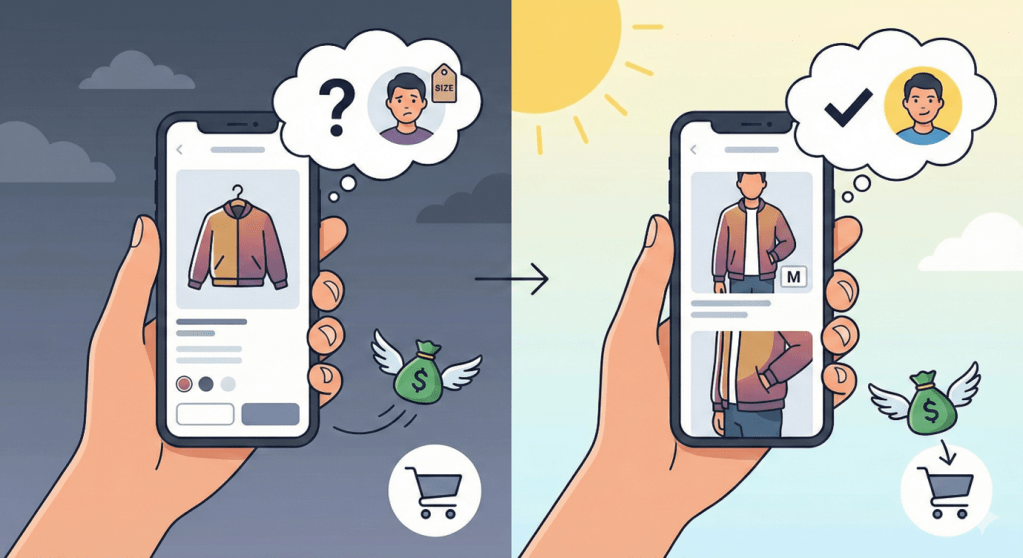
A leading clothing brand recently saw its mobile traffic grow by 40%, yet its sales did not move.
The problem was not their price—it was a “confidence gap.” Shoppers loved the photos, but they hesitated when it was time to pick a size. Because they could not answer the “How does it fit?” question quickly, they left the site.
Recent studies show this is a common problem. By simply changing the order of your product images, you can remove these doubts and increase buyer confidence by up to 28%.
Stop Letting “Visual Doubt” Kill Your Sales
Mobile shopping now drives nearly half of all online revenue. However, smaller phone screens make it harder for shoppers to judge a product. While 83% of people research products online before buying [1], only 18% of e-commerce sites provide a “good” mobile experience.
Many brands think that more images will help. In reality, a random pile of photos just confuses the buyer. High-converting pages don’t just show more; they show the right information in the right order.
The Strategic Goal: Your image sequence must answer three questions before a shopper decides to leave:
- Will it fit me?
- What does it feel like?
- Can I trust this brand?
Follow the “Confidence Sequence” to Guide the Buyer
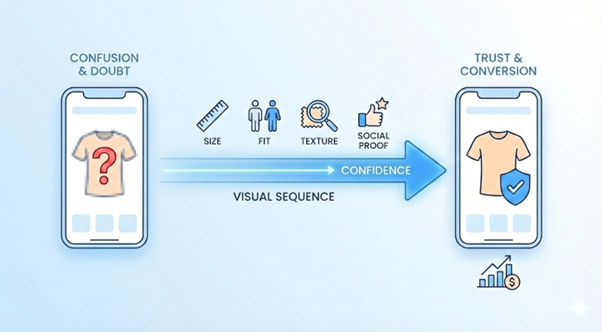
Don’t treat your image gallery like a random folder of files. Use this 4-step plan to move shoppers from browsing to buying:
1. Show the Real Size (The Anchor)
Start with a clear photo that defines the product. Always include a model or a familiar object so the shopper understands the size and scale immediately.
2. Prove the Fit (The Doubt-Buster)
Address the “fit” doubt second. Show size charts right on the product or show two different-sized models side-by-side. Do not make the shopper hunt for size guides.
3. Show the Texture (The Material Proof)
Since shoppers cannot touch the product, your images must do the work. Use close-up shots of the fabric or ingredients. Answer the question: “What am I actually touching?”
4. Show Real Success (The Social Proof)
End the sequence with real-world results. Use photos from real customers or shots of the product in use. Seeing other people happy with the product closes the deal.
Real-World Examples: Turning Doubt into Sales
Strategic re-sequencing drives measurable results:
- Solving the Size Problem: A jeans brand moved a “model height” photo to the second spot in their gallery. The result: Buyer confidence rose 28%, and returns dropped 12% in just three months.
- Winning the Speed Shopper: A skincare brand found that young buyers decide in under 15 seconds. By moving their “texture” photo to the third spot, they lifted mobile sales by 19% and sped up decision-making by 25% [2].
- Fixing Large Catalogs: A shoe company with 10,000 products created a standard rule for all its photos. This saved their design team 20% of their time and made the brand look much more professional [3].
4 Moves for Marketing Leads to Take Today
If you want to improve your product pages today, follow this checklist:
- Review your customer behaviour: Check your data to see where people stop scrolling. If your “fit” or “trust” photos are buried at the end of the gallery, move them up.
- Set a standard style: Create a simple rulebook for your team. Every product should follow the same Anchor → Doubt-Buster → Texture → Social Proof
- Check your mobile view: Look at your site on a phone, not a computer. Ensure the first three images tell the whole story.
- Prioritize trust for expensive items: For products over $150, move the “customer photo” to the second spot. High prices make people nervous; seeing a happy customer early helps them feel safe.
The Bottom Line: Sequence Drives Sales
In 2026, the brands that win will not be the ones with the most images. They will be the ones who sequence their visuals to dismantle shopper doubts in the exact order they arise.
Scale Your Visual Strategy with Enaiblex
Manually optimizing thousands of product images across a large ecommerce catalog is time-intensive and inconsistent. That’s where Enaiblex comes in.
Our Ecommerce Product Page Optimization service is purpose-built for the mobile first, AI assisted shopping era. We make your Product DetaPages AI discoverable so both human shoppers and AI shopping agents can understand, rank, and recommend your products.
- Automate product image sequencing across large catalogs using our Confidence Sequence framework (Anchor → Fit → Texture → Social Proof), so PDPs answer key buying questions in the order real shoppers and AI agents look for them.
- Deploy AI ready, mobile first PDP templates aligned with latest SEO fundamentals and Enaiblex’s Generative Engine Optimization (GEO) approach, structuring content for task completion and machine readability.
- Implement continuous testing and performance analytics to turn static PDPs into living storefronts that keep improving visibility and conversions over time
From image sequencing and alt text optimization to structured specs and trust-building content modules, we ensure your product catalog becomes your highest-performing sales channel.
Ready to close the confidence gap?
Book a strategy session to audit your mobile product pages and build a custom image sequencing roadmap for your catalog.
Citations:
- Google/Ipsos (2023). Online Research Before Store Visits. [1]
- Conversion Team (2024). E-commerce Product Page Best Practices. [2]
- Gartner (2024). Taxonomy and PDP Visual Grammar. [3]